เผยแพร่: 23 เมษายน 2569

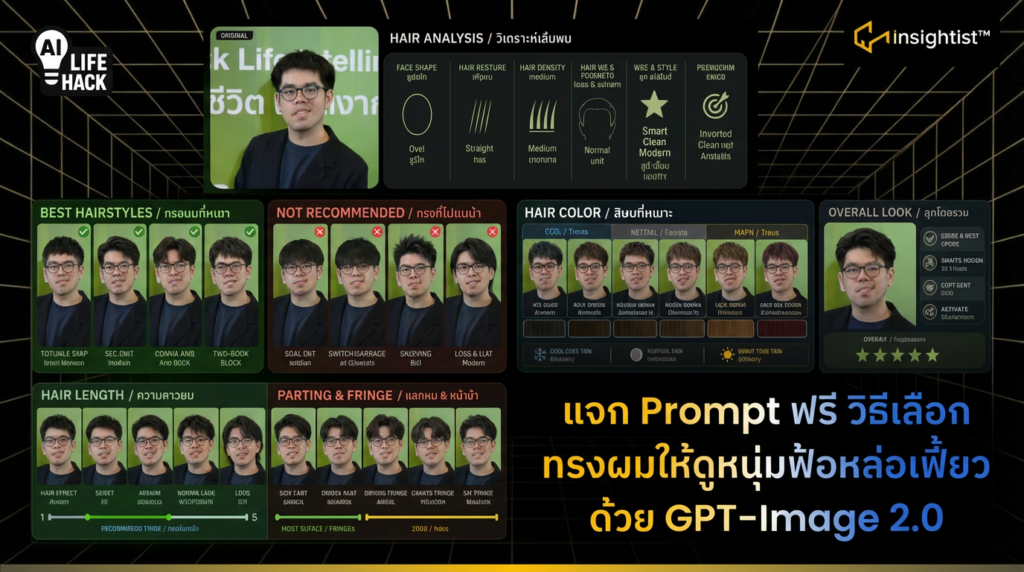
หลังจาก OpenAI เปิดตัว ChatGPT Image 2.0 จึงเกิดการเสกภาพที่หลากหลาย และต่อยอดเป็นภาพหลาย ๆ แบบ 1 ในนั้น คือ สามารถเลือกทรงผมได้เองเลย โดยที่ไม่ต้องเปิด Net เครดิตจาก ฮิปโปติส
ขั้นตอนการสร้างภาพ เลือกทรงผมให้เหมาะกับคุณ
- เข้าไปที่ ChatGPT
- พิมพ์ / เลือก Create Image
- ใส่ Prompt
พิมพ์ Prompt ว่า
Create a hair analysis graphic using this portrait.
Analyze and present:
Face shape (e.g., oval, round, square, heart)
Hair texture (straight, wavy, curly)
Hair density (thin, medium, thick)
Hairline and forehead proportion
Overall vibe and style suitability
Show visual comparisons of:
Recommended hairstyles vs Not recommended styles
Short / Medium / Long length options
Different fringe styles (no fringe, curtain bangs, side part, etc.)
Include sections:
BEST HAIRSTYLES / ทรงผมที่เหมาะ
NOT RECOMMENDED / ทรงที่ไม่แนะนำ
HAIR LENGTH / ความยาวผม
PARTING & FRINGE / แสกผม & หน้าม้า
HAIR COLOR / สีผมที่เหมาะ
Hair color analysis:
Warm / Cool / Neutral tones
Show color swatches and real examples on the portrait
Design style:
Clean, modern, visual-first
Side-by-side comparisons using the same portrait
Minimal text, short labels only (no paragraphs)
Language:
Include both English and Thai labels for all sections and elements
Optional:
Add a final summary section: “Overall Look / ลุคโดยรวม
ผลลัพธ์ คือ ได้ภาพทรงผมหล่อ เท่ หลากหลาย ก่อนไปร้านตัดผม เป็นแรงบันดาลใจสำหรับคนหนุ่มหล่อ