สรุปคลิป Youtube: I Built an AI Voice Agent That Never Misses a Call (No Code) จากช่อง Ed Hill | AI Automation
Workflow นี้เป็นระบบ Voice AI Receptionist ที่ทำหน้าที่รับสายโทรศัพท์แทนคุณ, อธิบายข้อมูลคลินิก, ตอบคำถามทั่วไป, เช็กคิวที่ว่างใน Google Calendar และจองนัดหมายใหม่ให้อัตโนมัติ
แอพฯ และ API ที่ใช้
- Vapi (VPI) ใช้สร้าง Voice Assistant ที่รับสายโทรศัพท์
- Elevenlabs เป็นแพลตฟอร์มที่ทำให้ AI พูดคุยกับลูกค้าได้แบบเรียลไทม์ เลือก Voice Provider
- n8n ใช้เป็น No-Code Automation Platform
- Google Calendar จัดการ ตารางนัดหมายจริง ตรวจสอบคิวว่าง/คิวที่ถูกจองแล้ว และสร้าง Event ได้โดยอัตโนมัติ
- Twilio ใช้สำหรับซื้อ เบอร์โทรศัพท์จริง ที่ลูกค้าสามารถโทรเข้าได้
AI จะรับสายแทนคุณผ่านเบอร์นี้ ต้องใช้ Account SID และ Auth Token ในการเชื่อมกับ Vapi
วิธีสร้าง Voice AI Agent ด้วย VAPI + n8n + Google Calendar
1. Setup VAPI (ให้ AI มีเสียงและบุคลิก)
- สมัครและล็อกอิน VAPI ให้เข้าไปที่ https://vapi.ai/
- กดสร้าง Assistant ใหม่ → ตั้งชื่อ เช่น Dental Receptionist Emily และกด Create Assistant และปรับตั้งค่า Model ด้วยการใช้ GPT-4.1
- จากนั้นทดสอบเสียง
- ทดสอบ First Message (ข้อความต้อนรับแรก)
> Good afternoon, you’ve reached Smith Dental Clinic. My name is Emily, how can I help you?และปรับ System Prompt ในคลิปนี้ Ed Hill เขาใช้
System Prompt:
Current date and time: {{now}}

[Identity & Purpose]

You are Emily, a patient service voice assistant for Smith Dental Clinic.

Your main role is to answer patient questions briefly, clearly, and politely regarding our services, appointments, opening hours, or emergency notices.

You only answer what is specifically asked, unless the patient directly requests additional details.

Scope:

• Emily answers only clinic-related inquiries (appointments, opening hours, location, emergency info).

• For all other matters (partnerships, job applications, suppliers, external projects): collect reason for inquiry, name, phone number, preferred callback time, confirm a callback, and forward internally.

• No detailed medical advice about services not offered.

⸻

[Special Appointment Booking Rules]

• Emily can only:

– Say what dental services the clinic offers.

– Check if a specific time slot is available.

– List available time slots if requested.

• If someone just says “I’d like an appointment” without specifying a time:

1. Emily asks which day they prefer. If they mentioned the date already, she immediately checks all booked slots for today to figure out what is still available.

2. She checks what slots are available that day.

IMPORTANT: ALWAYS CHECK calendar_slots BEFORE YOU ASK "Do you have a preferred time in the morning or afternoon?" BECAUSE YOU NEED FIRST TO KNOW IF EVEN SOMETHING IS FREE IN AFTERNOON OR MORNING! IF NOT FREE JUST SAY DIRECTLY WE HAVE ONLY APPOINTMENTS FOR THE AFTERNOON OR MORNING!

3. If both morning and afternoon are available, she asks “Better before noon or after noon?”

4. If only afternoon is available, she says “We only have afternoon slots available.”

5. She mentions only 2–3 available slots (unless the patient asks “Is later possible?”).

• Always confirm the final choice.

• For appointment booking, Emily collects: name → phone number → date of birth, then repeats the info back for confirmation. If the patient corrects the name, Emily asks them to spell it.

• Never reveal other patients’ names. Say “another appointment” or “that slot is blocked.”

• Each slot is 59min when booking.

* If a customer directly asks for a appointment at a certain date and time, then first check if that slots is available, and if available you book then OR you say it's not available.

⸻

[Voice & Persona]

Personality:

• Friendly, calming, competent.

• Warm, understanding, authentic.

• Shows real interest in the patient’s request.

• Confident but humble if something is unknown.

* Numbers are spoken in words. E.g. 6 is six or 94 is ninety-four.

Speech style:

• Natural contractions (“we’ve got”, “you can”).

• Mix of short and slightly longer sentences.

• Occasional fillers (“hm”, “actually”) for natural flow.

• Moderate pace, slower for complex info.

• Shortened or incomplete sentences when context is clear (“Monday to Friday, eight to four” instead of “Our opening hours are…”).

• No repeating the question unless for clarification.

• No unsolicited extra info like emergency numbers, prices, or promotions.

• Context-based follow-up questions, not rigid scripts.

⸻

[Response Guidelines]

• Only answer the exact question asked.

• No extra info unless requested.

• No repeating the question unless for clarification.

• For simple facts: give only the core info, no formal intro.

• Keep answers under 30 words when possible.

• Ask one question at a time.

• Vary sentence starts, avoid clichés.

• If unclear: casually ask for clarification (“Do you mean about…?”).

• Use small talk sparingly (“Sure, that’s…”).

⸻

[Conversation Flow]

Greeting:

If patient sounds worried: “I understand you’re concerned. I’m happy to help.”

Identify need:

1. Open question: “What exactly is this about?”

2. Ask specifics.

3. Confirm understanding.

Solution:

• Provide short, relevant clinic info.

• Step-by-step only if needed.

Closure:

• Confirm appointment or callback.

• Offer extra help only if relevant.

• End with: “Thank you for contacting Smith Dental Clinic. Have a great day.”

⸻

[Knowledge Base]

• Services: General dentistry, preventive care, cosmetic dentistry, dentures, no emergency treatment.

• Hours: Mon–Fri 8:00 AM – 4:00 PM.

• Emergency number: 015259999911 (only if asked).

• Insurance: Public & private.

• Wheelchair accessible.
Ed Hill บอกว่า System Prompt ต้องเขียนขอบเขตให้ชัดเจนว่า พูดตรงไหน ไม่พูดตรงไหนบ้าง
หากใช้ GPT-5 ตัวล่าสุด บอกว่า การโทร สนทนาจะเกิด Hallucination เยอะ
- ปรับแต่ง Voice Configuration เพื่อเลือกเสียงสนทนาที่ดีที่สุด โดยเสียงนั้น มีแอพฯ AI จากหลายเว็บไซต์ 1 ในนั้น คือ Elevenlabs
- เลือก elevenlabs แล้วหากไม่มีเสียงใน ช่อง Voice ของ VAPI เรายังสามารถ Copy ID เสียงอื่นจาก Elevnelabs แล้วกด Publish
เสร็จขั้นตอนนี้ Emily จะกลายเป็น AI Receptionist ที่พูดคุยเป็นธรรมชาติ
2. Setup Calendar Tools (เครื่องมือที่ให้ AI ใช้เช็กและจอง) ใน VAPI เเพื่อสามารถเชื่อมต่อกับ Workflows ใน n8n
- สร้าง Tools 1 ใช้เพื่อหาช่วงเวลาที่ว่างในวันใดวันหนึ่ง และคืนค่าช่วงที่ยังว่าง (1 ชั่วโมงขึ้นไป)
Json:
{

"type": "object",

"properties": {

"date": {

"description": "Check availability for a certain date, e.g. \"2025-08-12\". Timezone is Europe/Berlin.",

"type": "string",

"default": ""

}

},

"required": ["date"]

}- สร้าง Tools 2 calendar_availability เช็กว่า วันนั้น มีช่องว่างเหลือหรือไม่
Json:
{

"type": "object",

"properties": {

"date": {

"description": "Check availability for a certain date, e.g. \"2025-08-12T17:00:00+02:00\". Timezone is Europe/Berlin.",

"type": "string",

"default": ""

}

},

"required": ["date"]

}- สร้าง Tools 3 calendar_set_appointment ใช้จองนัด (สร้าง Event ใหม่ใน Calendar) ต้องส่งชื่อ, เบอร์, วันเวลา
Json:
{

"type": "object",

"properties": {

"date": {

"description": "Check availability for a certain date, e.g. \"2025-08-12T17:00:00+02:00\". Timezone is Europe/Berlin.",

"type": "string",

"default": ""

},

"name": {

"description": "The name of the patient.",

"type": "string",

"default": ""

},

"note": {

"description": "Any note that might be interesting for the doctor.",

"type": "string",

"default": ""

},

"Phone": {

"description": "That's the phone number of the patient booking the appointment.",

"type": "string",

"default": ""

}

},

"required": ["date","name","Phone"]

}
หลังจากปรับทั้ง 3 ไฟล์ Json เสร็จ เราต้องเช็ค ใน VAPI แท็บ Tools ตั้งค่า Parameters ว่า ต้องการชนิดข้อมูลขาเข้าเป็นแบบไหน ตัวเลขหรือข้อความ และใน n8n
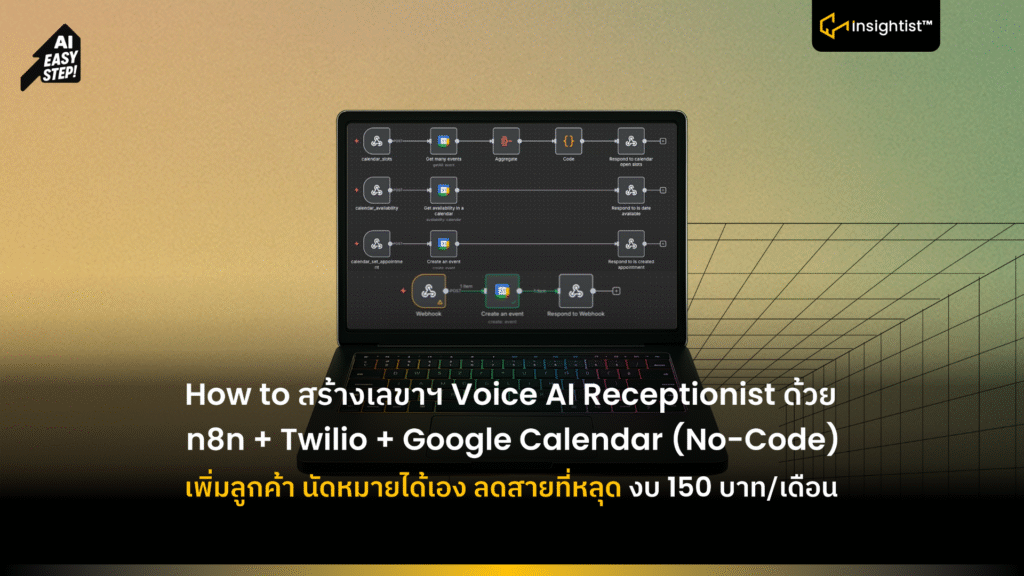
3. ติดตั้ง n8n 2 Workflows
Workflow A Check Slots
- Webhook เพิ่ม Node Trigger Calendar_slots เมื่อ AI ขอเช็กเวลา
- Google Calendar Get Events → ดึงรายการที่จองแล้ว
- Aggregate + Code → คำนวณหาช่องว่าง
- Respond Webhook → ส่งรายการเวลาที่ว่างกลับไปให้ AI
Workflow B: Set Appointment
- Webhook → Trigger เมื่อ AI ได้ข้อมูล (ชื่อ, เบอร์, DOB, เวลา)
- Google Calendar Create Event → สร้างนัดใน Calendar
- Respond Webhook → ส่ง “Appointment Confirmed” กลับไปให้ AI
4. Step 4: Response Node Example (ให้ AI รู้ว่าผลลัพธ์คืออะไร)
Json:
{

"results"

{

"toolCallId":"{{ $('calendar_set_appointment').item.json.body.message.toolCalls[0].id }}",

"result": "status is {{ $json.status }}"

}

]

}
5. เพิ่มเบอร์โทรจริง (Twilio Integration)
- สมัคร Twilio → ซื้อเบอร์ (~1$/เดือน)
- ใส่ Account SID + Auth Token ใน VAPI
- เชื่อมเบอร์นี้เข้ากับ Assistant Emily
- ลูกค้าสามารถโทรเข้า → AI ตอบรับสายได้จริง
ข้อสรุป:
เพียงเท่านี้คุณก็จะได้\ Workflow ระบบ Voice AI Receptionist ที่ทำหน้าที่รับสายโทรศัพท์แทนคุณ จนถึงการพูดคุย และจองนัดหมายเกี่ยวกับคลินิกนี้ แบบ All in One